I Wasted 4 Hours Setting Up Prisma — Here’s How You Should Set Up Prisma v7
A few weeks back when I was learning about Prisma to use it in my project with PostgreSQL, I got to the docs of Prisma and set it up like it was said in the docs.
But then many errors occurred, which stopped my codebase from running, and I am sure many of you are experiencing those errors; that’s why you are reading this blog.
Here are some of the errors that are occurring:
1. TypeScript Says string | undefined Is Not Assignable to string
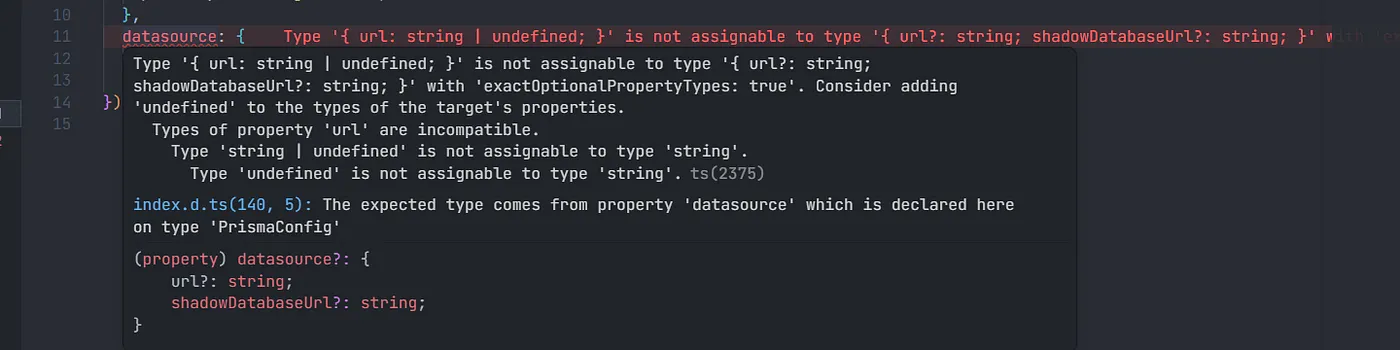
Here TypeScript will complain that it expects the URL to be a valid string, and the value that you are providing can be a string or undefined inside the prisma.config.ts file.
2. prisma.config.ts is outside root directory

We know that in TypeScript we keep everything in the src folder because it compiles to JavaScript into the dist folder.
Here, TypeScript starts complaining that we should keep the prisma.config.ts file in the src folder.
And here we should not put prisma.config.ts inside src because it’s a configuration file, not a source code file. In src, we store routes, controllers, databases, and source code things.
Storing prisma.config.ts inside src will not be considered a best practice.
3. generated/prisma file is not under root directory
When you generate the Prisma client in the new version of Prisma, it creates a generated file that contains all the PrismaClient code.
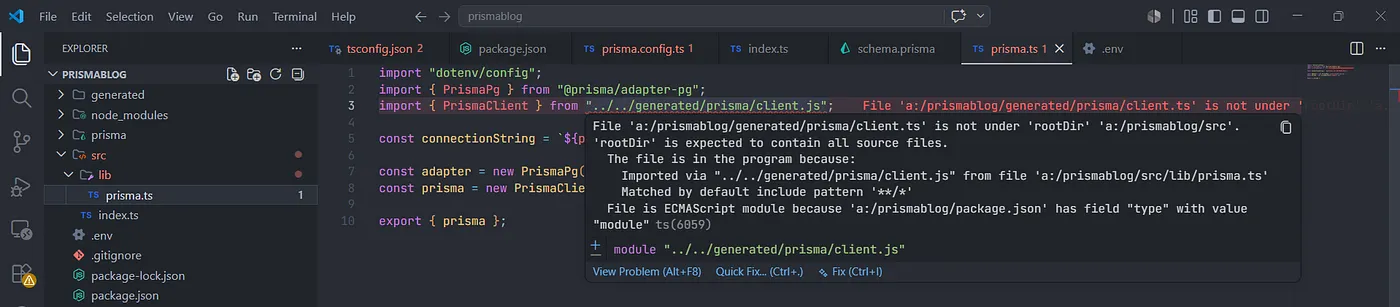
The TypeScript will start complaining that the generated folder should also be under the root directory, which is src.
But we should not keep the generated/prisma folder inside src because it’s auto-generated code that is generated by Prisma when generating the client.
We know that the src folder should contain the project’s source code, like routes, controllers, etc. Putting the generated/prisma folder inside src will not be a good practice.
and after this when you try to run your project many errors will occur in your terminal and your project will not start running.


the js files of prisma.config.ts will get generated outside the dist folder which is also a problem it will make your codebase look bad.
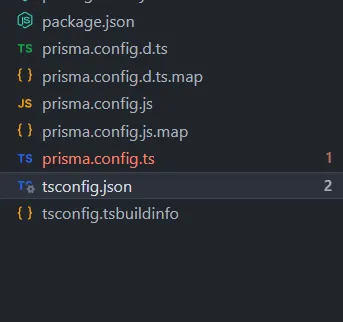
These are the errors that kept occurring when I was setting up Prisma, and when I was trying to solve them, it created more and more errors.
After seeing some repositories on GitHub and reading some more blogs and doing some more FAFO, I finally understood how to set it up so that no error occurs.
So now I am going to show you how to set up Prisma without any errors so that you can use it in your projects without any problems.
Step 1:-
Initialize an empty TypeScript project by running these commands and install the necessary Prisma packages and dependencies:
npm init
npm install typescript tsx @types/node --save-dev
npx tsc --init
npm install prisma @types/pg --save-dev
npm install @prisma/client @prisma/adapter-pg pg dotenv
Step 2:-
Add "type": "module" to your package.json file.
{
  "type": "module"
}
and set the root dir and out dir and create a root directory src.
"rootDir": "./src",
"outDir": "./dist",
Step 3:-
Run these two commands:
npx prisma
npx prisma init --datasource-provider postgresql --output ../generated/prisma
These two commands will set up the Prisma ORM in your codebase and create a prisma.config.ts file and a prisma folder, which contains your schema.prisma file, and create an .env file, which will contain your database URL.
Step 4:-
Now this is the stage where a bunch of errors will occur, and you will try to solve them, and then you will create more errors.
So now what you need to do is the following:
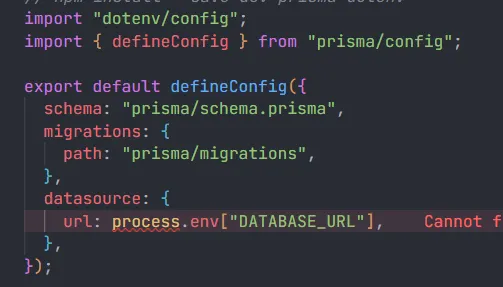
Change your prisma.config.ts file code to this code:
import "dotenv/config";
import type { PrismaConfig } from "prisma";
import { env } from "prisma/config";

export default {
  schema: "prisma/schema.prisma",
  migrations: {
    path: "prisma/migrations",
    seed: "tsx prisma/seed.ts",
  },
  datasource: {
    url: env("DATABASE_URL"),
  },
} satisfies PrismaConfig;
Now after changing the prisma.config.ts, it will not complain about the fact that the URL, which you are giving, can be a string or undefined.
Now add this line at the end of your tsconfig.json file:
"include": ["src"],
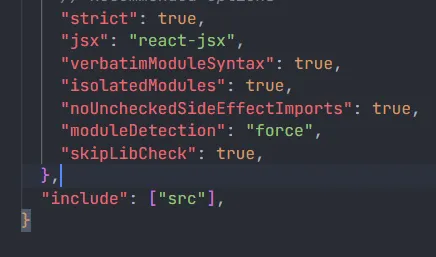
Add this line, "include": ["src"], at the end of the tsconfig.json file.
This will eliminate the error that complains about putting the prisma.config.ts file inside the src folder.
Now change your schema.prisma file from this:
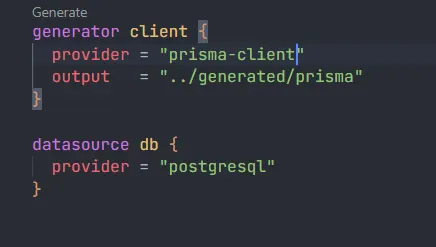
to this:
generator client {
  provider = "prisma-client-js"
}

datasource db {
  provider = "postgresql"
By doing this, we eliminate the creation of a generated/prisma file when we generate a Prisma client, and now the Prisma client will be generated inside the node_modules folder.
And due to this, the error that will complain about putting the generated/prisma folder inside src will not occur.
That’s it; these are the few changes you have to make for solving the occurrence of errors.
Step 5:-
Now add your database URL inside the .env file.
DATABASE_URL="postgresql://johndoe:randompassword@localhost:5432/mydb?schema=public"
Create your models inside the schema.prisma.
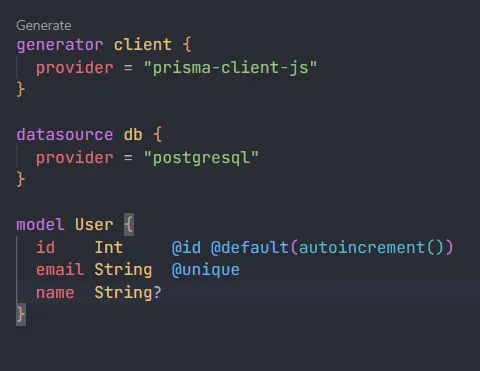
Migrate your database using the following command:
npx prisma migrate dev --name init
Step 6:-
Generate your Prisma client by running this command:
npx prisma generate
Step 7:-
Now create prisma.ts inside a lib folder, which will be inside your root directory src, to create an instance of your PrismaClient so that you can send CRUD requests or talk to your database.
Write this code inside the prisma.ts file:
import "dotenv/config";
import { PrismaPg } from "@prisma/adapter-pg";
import { PrismaClient } from "../../node_modules/@prisma/client/index.js";

const connectionString = `${process.env.DATABASE_URL}`;

const adapter = new PrismaPg({ connectionString });

const prisma = new PrismaClient({ adapter });

export default prisma;
and make sure that you are importing the PrismaClient from the node_modules.
import { PrismaClient } from "../../node_modules/@prisma/client/index.js";
Now you just have to import this Prisma instance in your files and do your CRUD logic inside your controllers or whatever you want to do.
just like this:
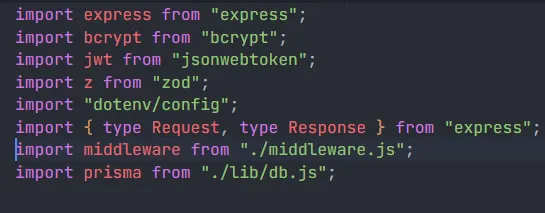
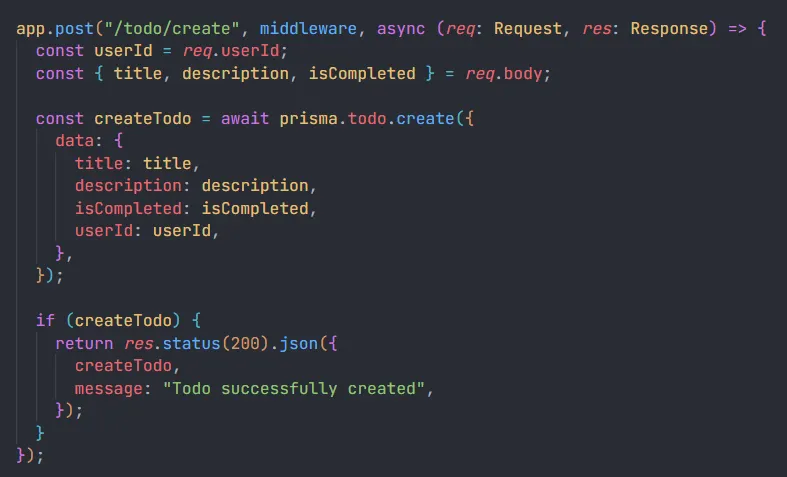
That’s it. Now your Prisma is set up fully, and you can easily create new models, migrate and generate the Prisma client, and talk to your database without any inconvenience or errors.
If you are still having some problems, then you can see the GitHub repository and take help from it and see how I’ve initialized Prisma in it.
GitHub Repository: https://github.com/amannv/Cohort-3.0-100xDevs/tree/master/week-18-assignment
That’s it for this blog. If this blog helped you in any way, then please like, comment, and share.
Till then, happy learning! :)